
Paddy Power App Review & User Guide
Paddy Power app review
The Paddy Power app is Flutter Group’s Irish bookmaker on mobile — a familiar, punchy sportsbook with strong offers, novelty markets and free UK/Irish racing streams. It stands out for personality as much as product.
We’re huge fans of the desktop service and that only transfers itself to the Paddy Power app. With an in-depth series of markets and selections, users are never short of finding a decent wager. Registered customers also get games like Beat the Drop (terms apply, 18+).
Smooth navigation suits new and experienced punters, and the promotions make it more fun to play. It’s worth opening a Paddy Power account and downloading the app if you want a lively all-rounder alongside sharper-odds books.
Quick takeaways
- Customisable home toolbar and clear sports navigation
- Strong live betting list plus cash-out on most markets
- Free live streaming on all UK and Irish racing (logged-in users)
- Bet Builder plus #WhatOddsPaddy / request-a-bet via support
- Power Prices, 2 Up You Win and frequent specials for football fans
Best for
- Football with Power Prices and same-game builders
- Horse racing fans who want free streams
- Novelty and request-a-bet punters
Company (short)
- Address: Belfield Office Park, Beech Hill Road, Clonskeagh, Dublin 4, D04V972
- Support: live chat in-app
- Social: @paddypower · Facebook /paddypower · Instagram @paddypowerofficial · @AskPaddyPower for bet requests
Current new customer offer
The live welcome offer and claim button sit in the header above — always read those terms before you join. Headline wording can change; use the header as the source of truth.
What you will find on the Paddy Power app
Paddy Power has long punched above its weight in the betting market, and the mobile product follows the same pattern. Ease of use, a simple design and a huge range of markets — football, horse racing, greyhounds, major US sports and an expansive novelty book — put most bets a couple of taps away. The app essentially mirrors the desktop site on mobile, so you can bet on any market anytime.
Within a second of opening, live markets, offers and a customisable toolbar are front and centre. Below: Bet Builder, free racing streams and the request-a-bet banner.


Other Paddy Power apps
Flutter also publishes separate Paddy Power products. Download a sister app only if that’s what you want — this page focuses on the sports app.
Casino
Playtech-powered casino with a large game mix (slots, table games, live dealer and more). Also reachable from the sports app menu.
Bingo
Dedicated bingo rooms and side games for players who prefer bingo over sports.
Live Casino
Live dealer tables streamed to mobile for roulette, blackjack and related games.
Games
Slots-focused companion for players who mainly want machine games.
Poker
Poker is available from the sports app menu; a dedicated poker app exists for regulars.
Onside
Blends shop and online — useful if you use Paddy Power retail as well as the app.
App features
Jump to a topic:
Great functionality
Functionality is one of the app’s strongest points. Navigation is among the clearest of any UK sportsbook. On the homepage, a row of icons at the top can be edited to show the sports and markets you use most — tap football and you’re straight into leagues and markets, from match results to booking points and more exotic lines.
Adding selections to the bet slip is quick for singles and accumulators. Advanced multiples (Lucky 15, Yankee, Trixie and similar) are available directly from the bet slip. The bottom menu moves you between sports, casino and a Cash-Out area to collect early when offered.
Live sports betting
Paddy Power carries one of the more expansive live-betting lists. Tap the In-Play icon in the customisable menu bar for live options across sports. Cash-out is available on most live markets — check the cash-out icon is present before you stake specials that may not support it.
Live streaming
Streams cover a useful set of sports (rights and location permitting). Meet any stated minimum wager on the event if required; when a stream is available it sits on the event markets page. Football examples often include Serie A, Ligue 1 and Eredivisie. Greyhounds, basketball and handball frequently carry streams too.
Racing highlight: all UK and Irish horse racing meets can be watched free once you are registered and logged in — no stake-on-the-race or funded-account gate like some rivals. Open the race markets and hit Watch Live.
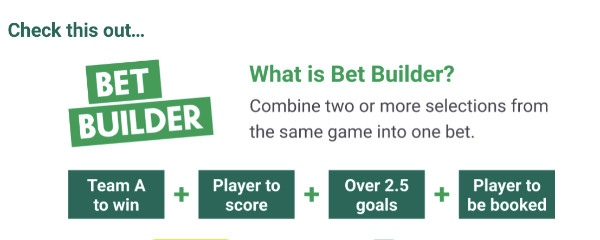
Paddy Power’s Bet Builder
Combine multiple markets from the same football or basketball event into one priced bet. Open a valid event and look for Bet Builder in the top menu of the markets page. The picker can feel busy because so many markets are listed — scroll to find what you need. Around 50 markets have been available when we last checked, including:
- Match odds
- Player to have a shot / shot on target
- Both teams to score
- Player bookings
- Anytime assist
Bet Builder insurance appears from time to time (for example stake back up to a stated maximum if one leg of a four-plus builder fails — terms apply). Check Promotions for whether it’s live.
Request a bet — Paddy Power style
If Bet Builder doesn’t cover what you want, or the event has no builder, you can request a price from the traders. Message @AskPaddyPower on Twitter/X or email SMPriceRequests@paddypower.com. You’ll get a decline or a link to the priced market. You can also tweet with #WhatOddsPaddy.
Football betting
Power Prices regularly boost feature matches and competitions toward market-leading odds. The 2 Up — You Win early-payout special (when live) pays your bet as a winner if your team goes two goals up, even if they later draw or lose — check the promotions tab for current leagues and terms.
An Access-style tab helps pick multiples from the same day, league or competition. The live football hub shows scores and quick match-result prices; open a match for the full in-play list (50+ markets on major games).
Horse racing betting
Racing is where the app often excels. Free streams on all UK and Irish racing (logged in), Racing Post-style information on racecards, and tips aggregated from media sources such as The Times and The Guardian. World racing is covered with a narrower market set. Specials and ante-post run deep (festivals up to around 12 months out). Virtual racing turns over about every two minutes between real races.
Paddy Power app user guide
Walkthroughs for the everyday tasks on the Paddy Power app — placing bets, registering, depositing, checking bets, verifying, withdrawing, history, free bets, cash-out markets and support.
How to place a bet
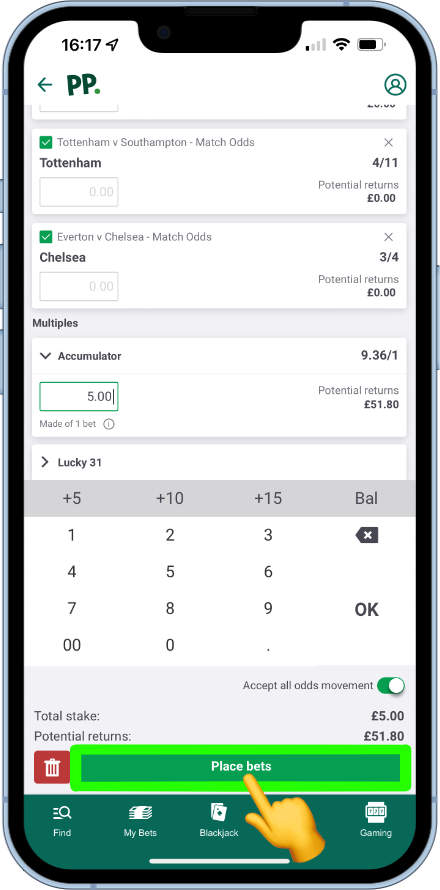
You need a funded account or a free bet. Example: a £5 Premier League accumulator.
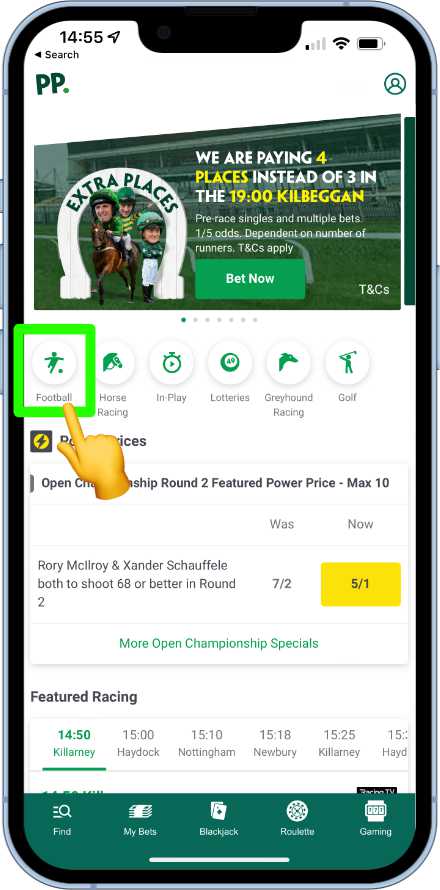
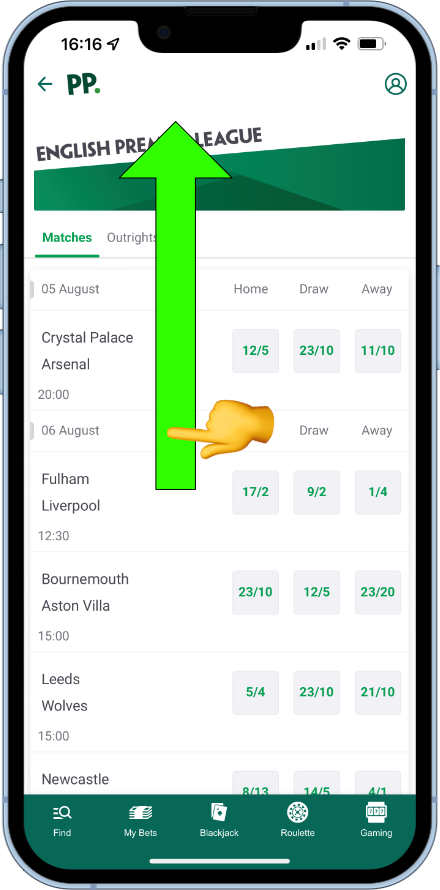
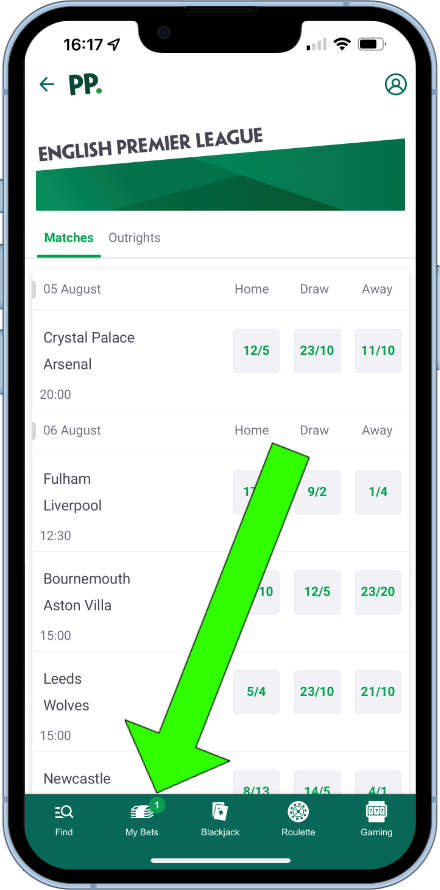
- From the home page, tap the football icon.
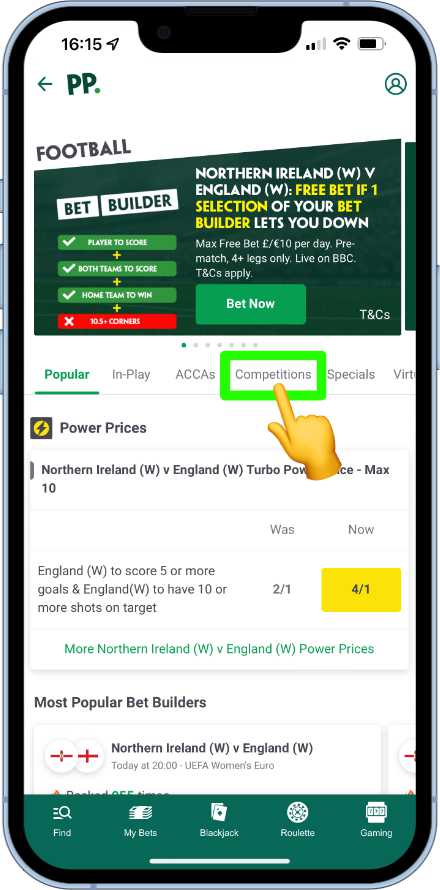
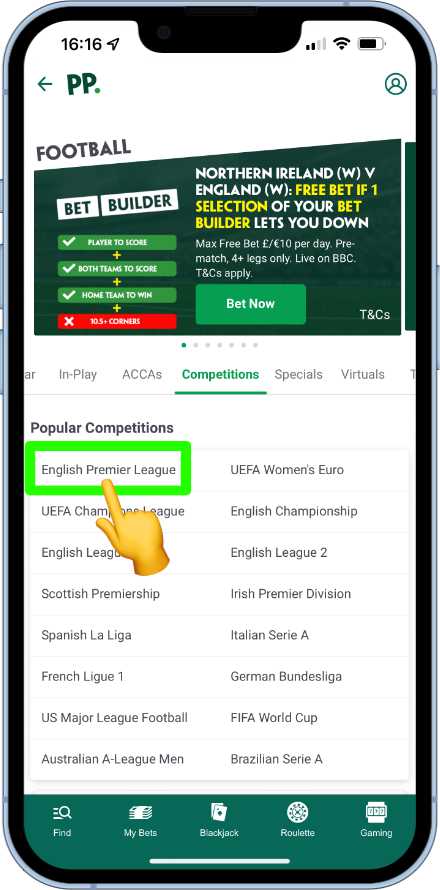
- Open the Competitions tab and choose English Premier League.
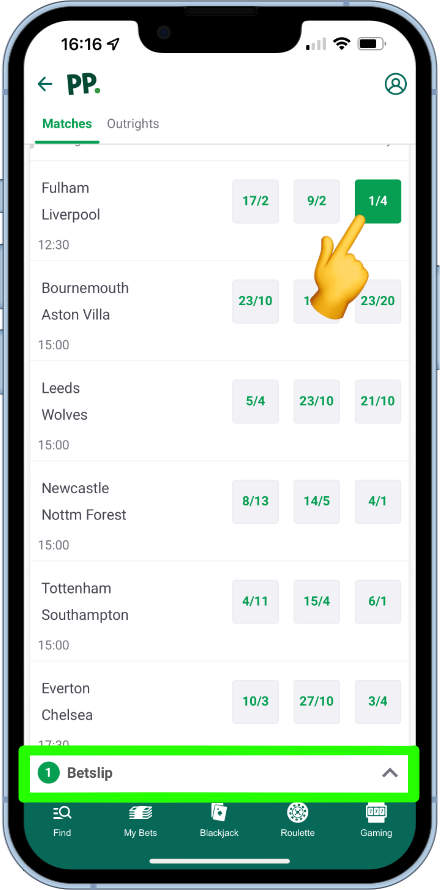
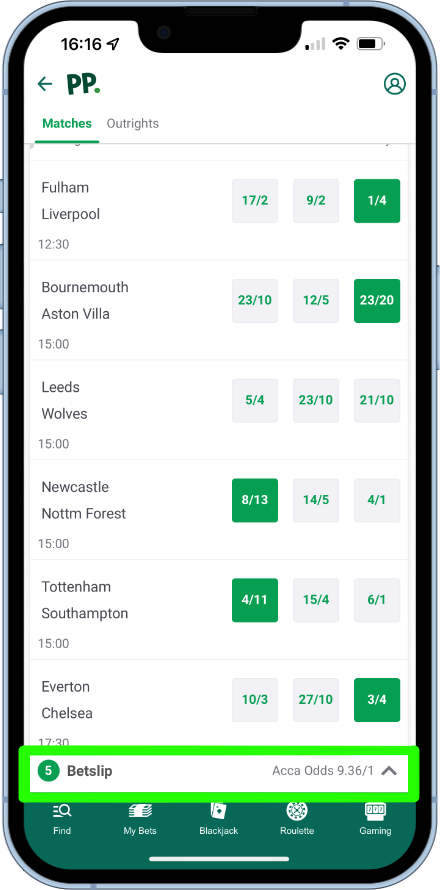
- Browse fixtures and tap prices to add selections — the price turns green and a minimised bet-slip bar appears.
- Add further legs until you’re happy; combined odds flash briefly on the bar.
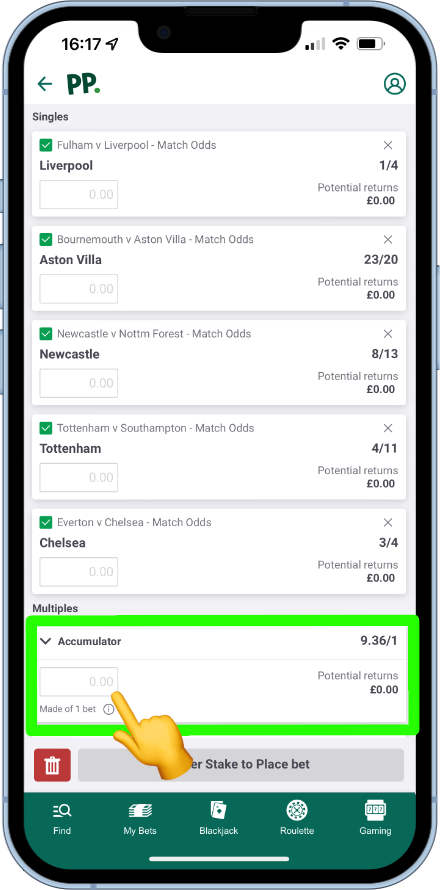
- Tap the bet-slip bar. Set a stake on the accumulator field (singles use the fields under each selection).
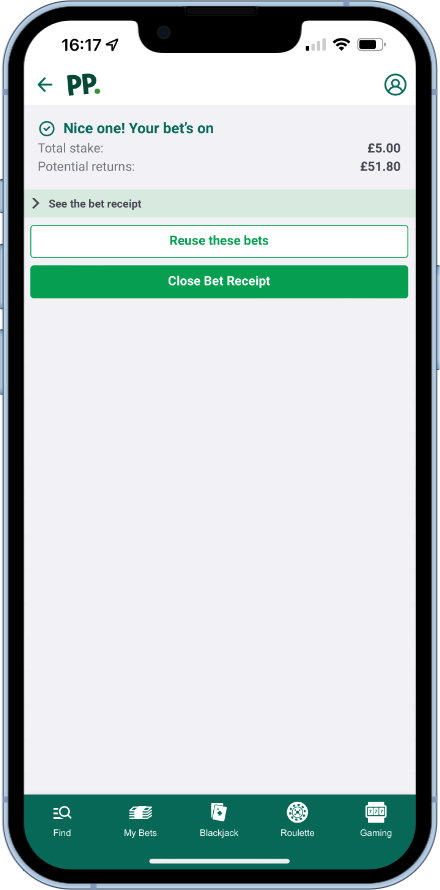
- Tap Place bets and review the confirmation summary.
How to register
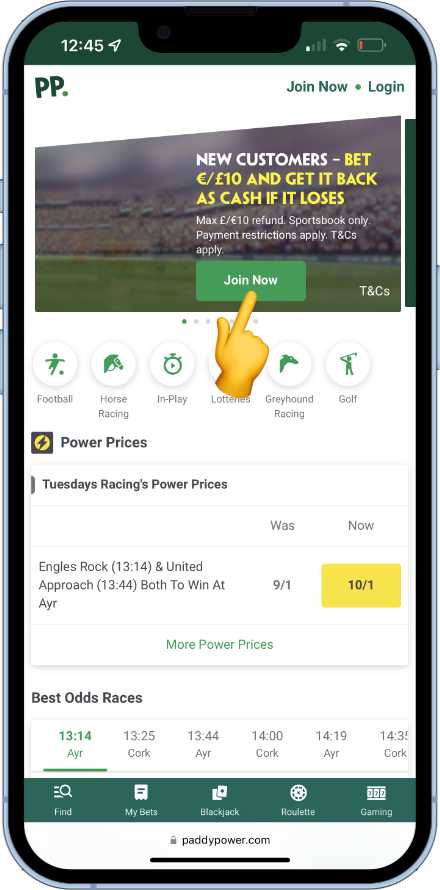
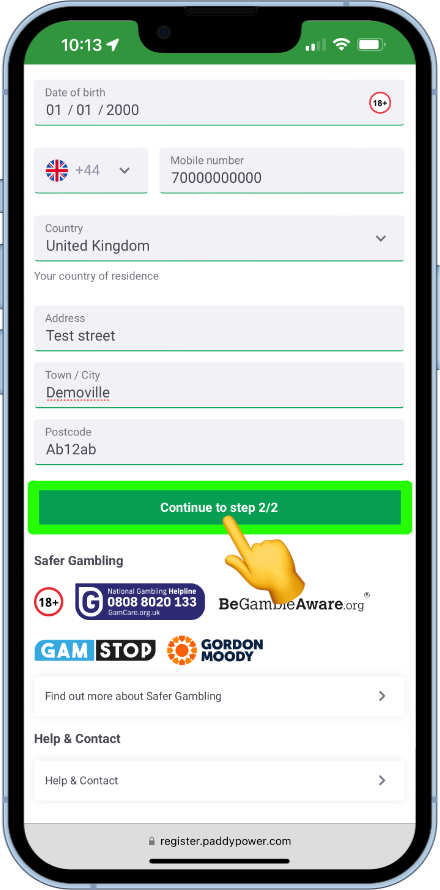
Registration takes a few minutes. You must be 18+. Use the Get App / Claim Offer button in the header when you’re ready — the promo code for the new-customer offer is usually pre-filled on the join form.
- Tap Join Now to open the form.
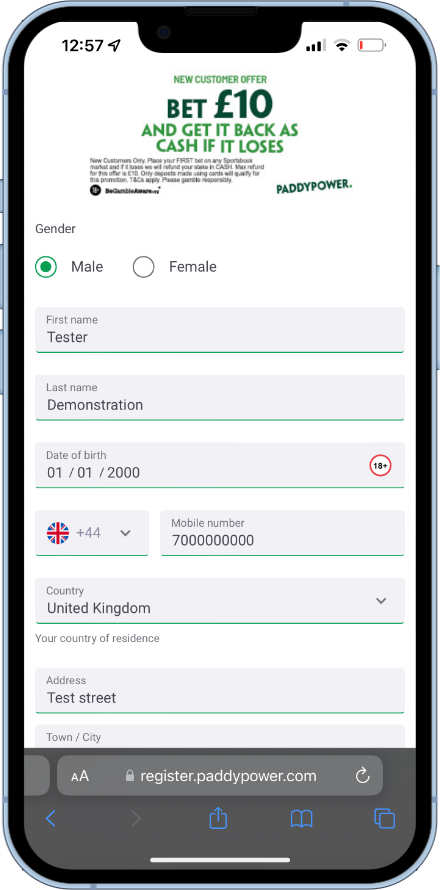
- Step 1: gender, name, date of birth, mobile, country and full postal address — then continue.
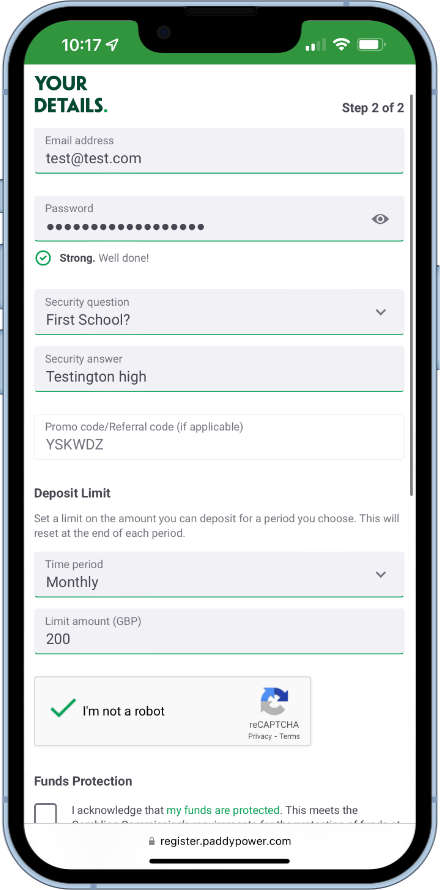
- Step 2: email, password, security question; confirm the promo code box; set a daily, weekly or monthly deposit limit.
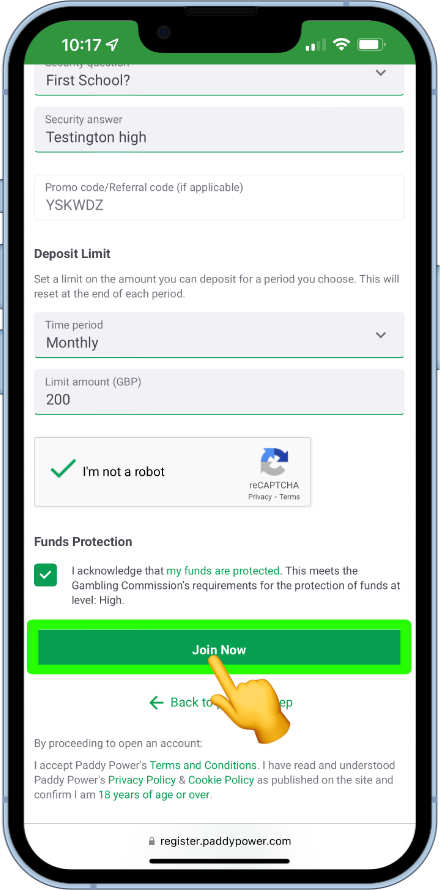
- Complete reCAPTCHA, agree to the funds-protection statement, then tap Join Now.
You can then add a payment method, deposit and bet. You may be asked to verify details — see Verify below.
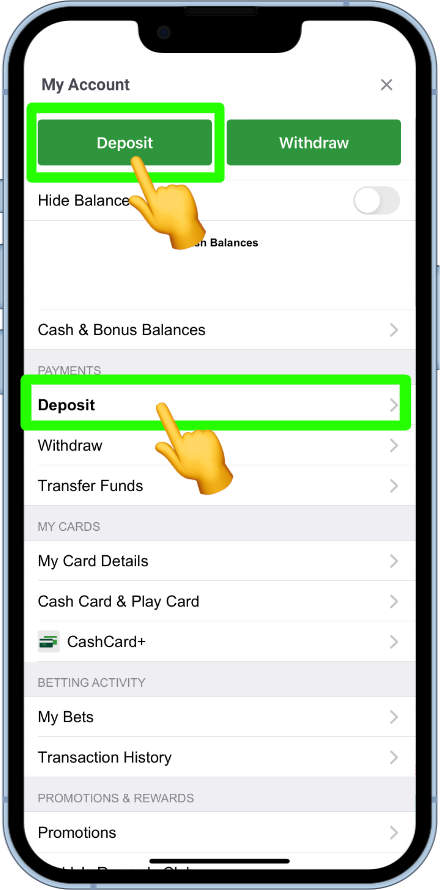
How to deposit
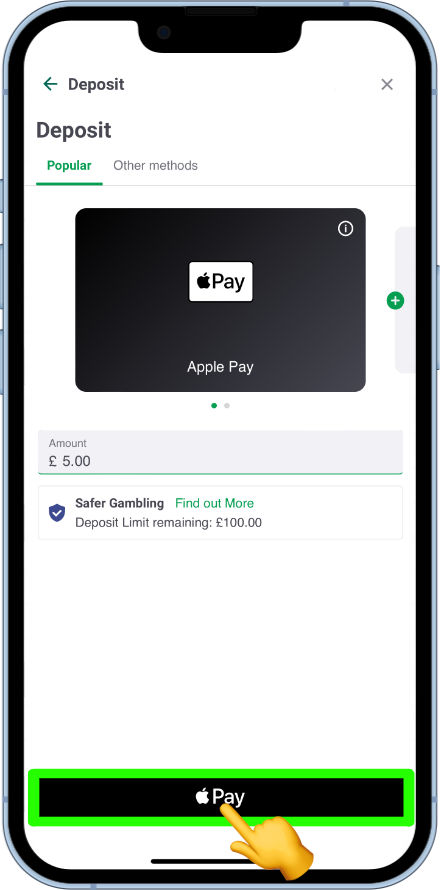
Common methods include Apple Pay, debit card, bank transfer, Paysafecard, Skrill, Neteller, MuchBetter, Rapid Transfer, PayPal and the Paddy Power cash card. Apple Pay and debit card often allow £5 minimums; some other methods start around £20.
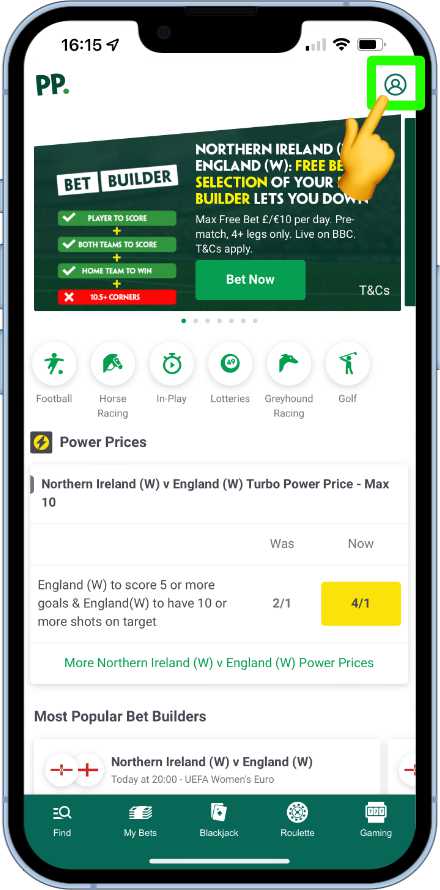
- Tap the user settings icon → Deposit (or Deposit under Payments).
- Choose or add a method (example: Apple Pay).
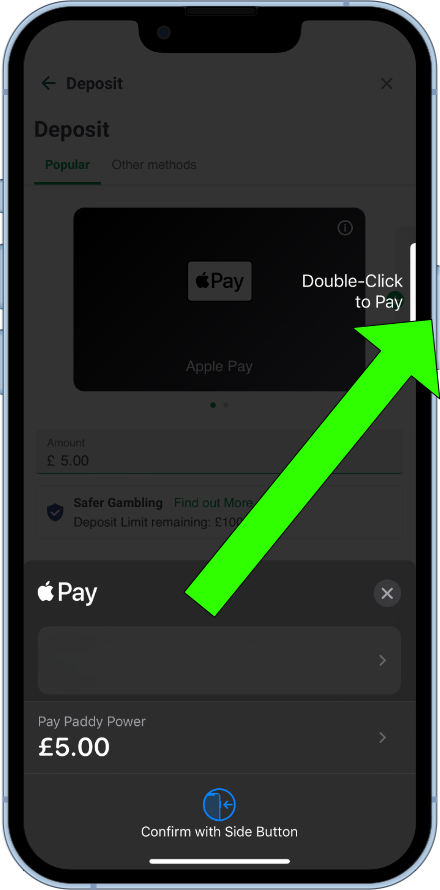
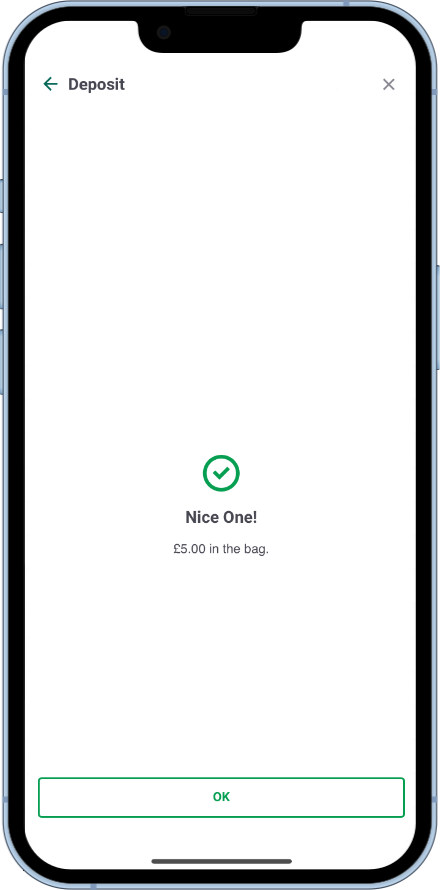
- Confirm the amount and authenticate (Face ID / Touch ID / passcode on iPhone).
How to check bets
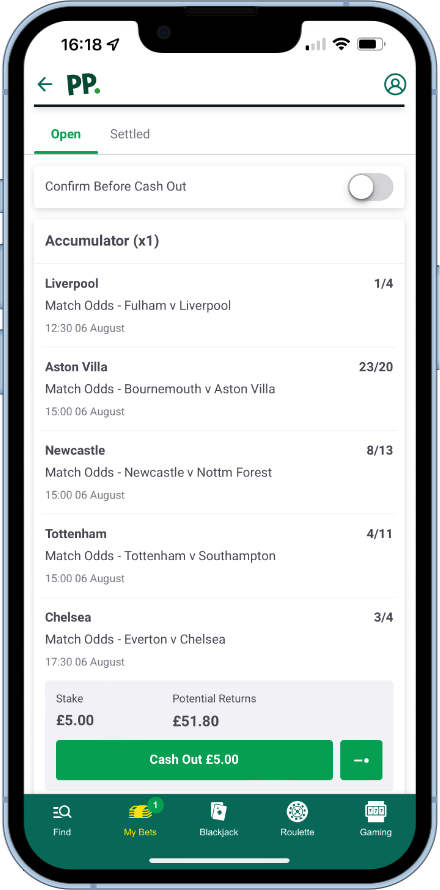
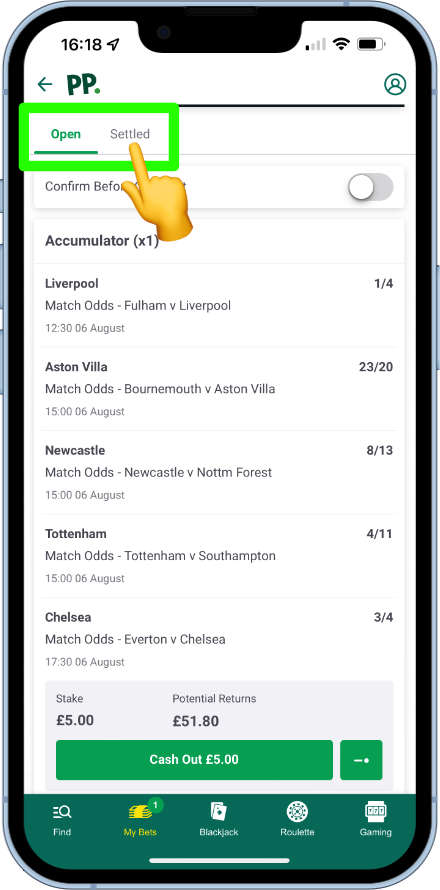
My Bets sits on the bottom menu. Open bets list in a scrollable view with any cash-out offers shown on each bet. Toggle the top filter for recently settled bets.
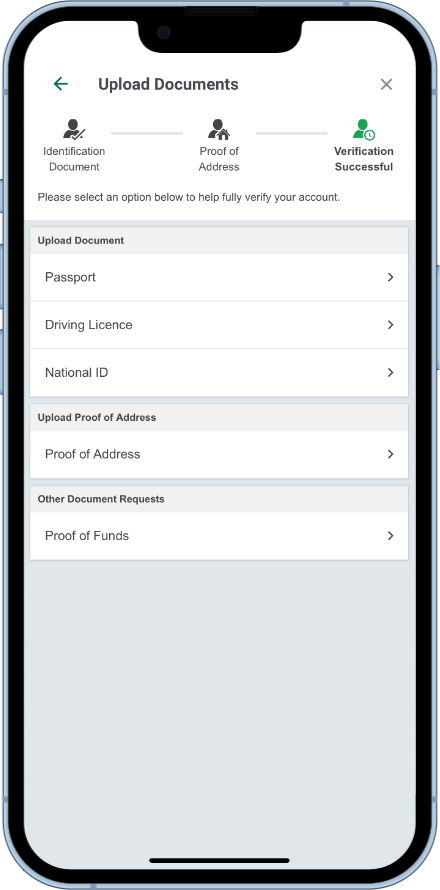
How to verify a Paddy Power account
Paddy Power may ask for more information for affordability (source of funds) or identity / age checks when automated checks aren’t enough.
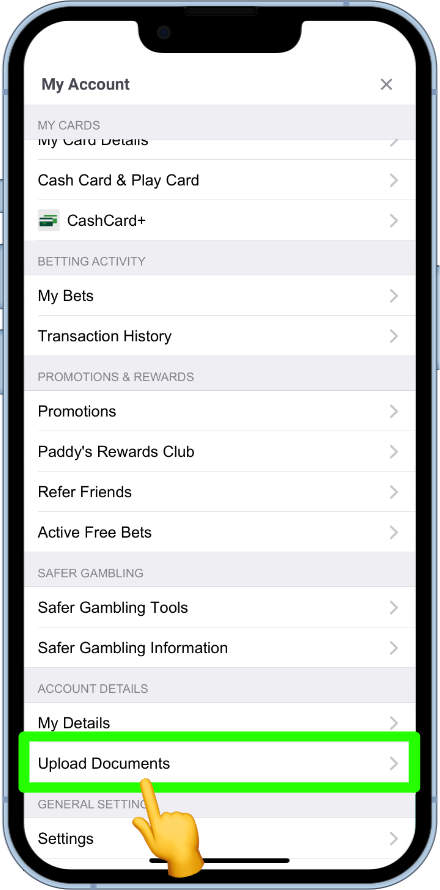
- Open user settings from the home page.
- Under Account details, tap Upload documents.
- Upload the documents requested; the verification team reviews them.
How to withdraw
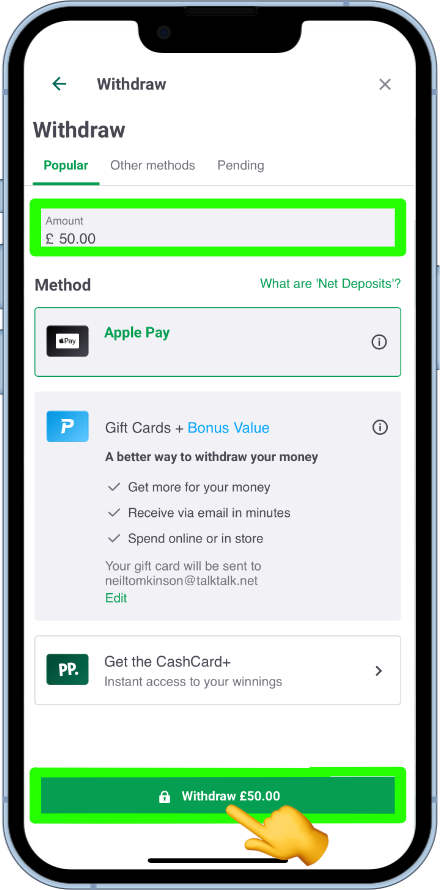
Prefer withdrawing to the same method you deposited with. Regular methods are supported; frequent players may also use branded cash cards at shops and ATMs.
- Open user settings → Withdraw.
- Enter the amount, confirm the method, tap withdraw.

How to close a Paddy Power account
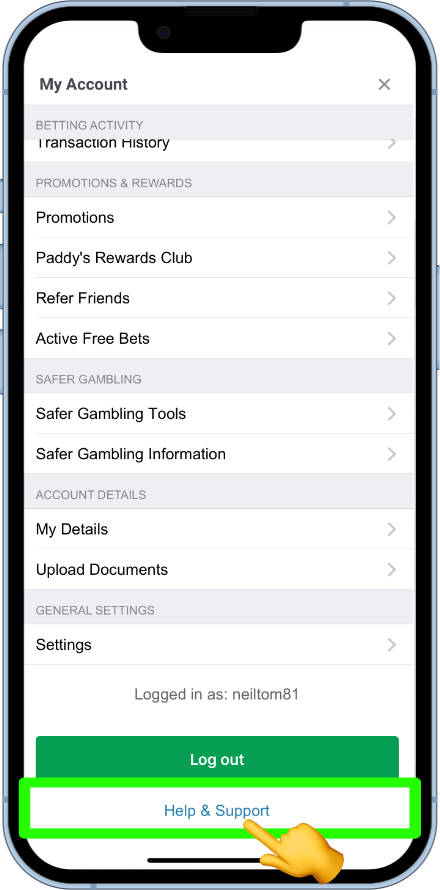
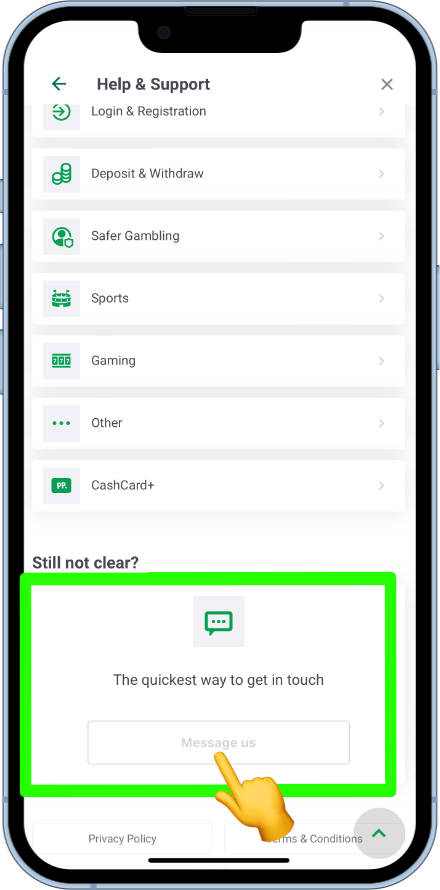
Standard closure (you may return later) is handled via live chat: user settings → Help and support → Message us. Permanent closure for gambling-harm reasons is via the self-exclusion tool — see Responsible gambling below.
How to find bet history
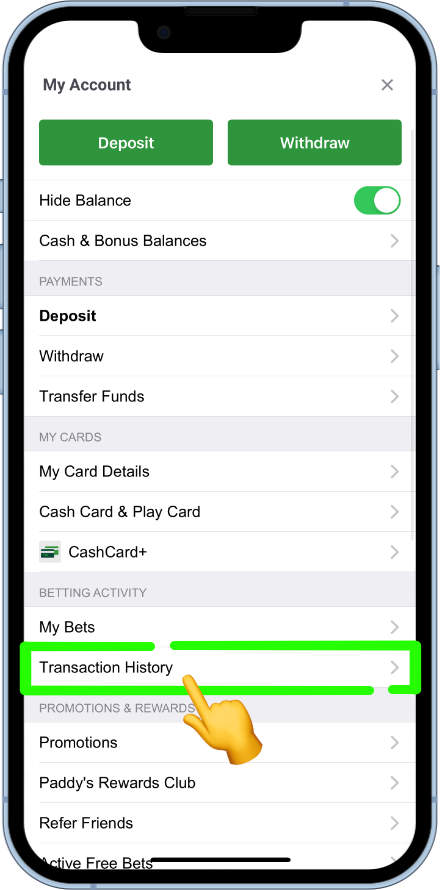
Recent bets sit under My Bets. For a longer look: user menu → Betting activity → Transaction history, then set a date range.
How to view free bets
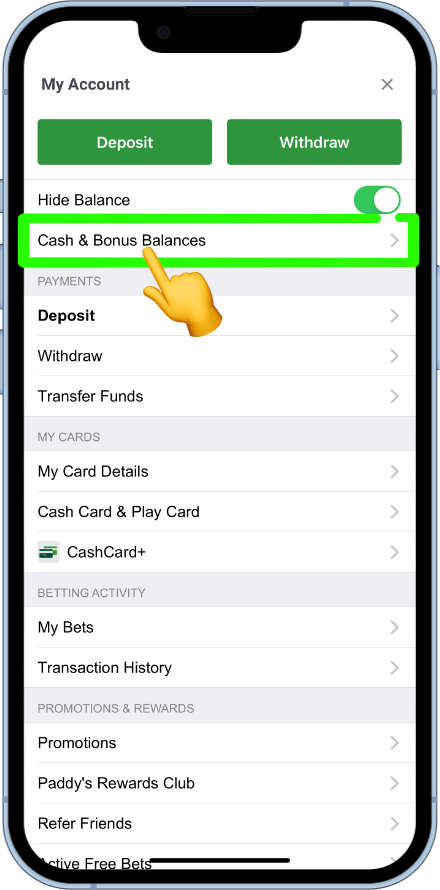
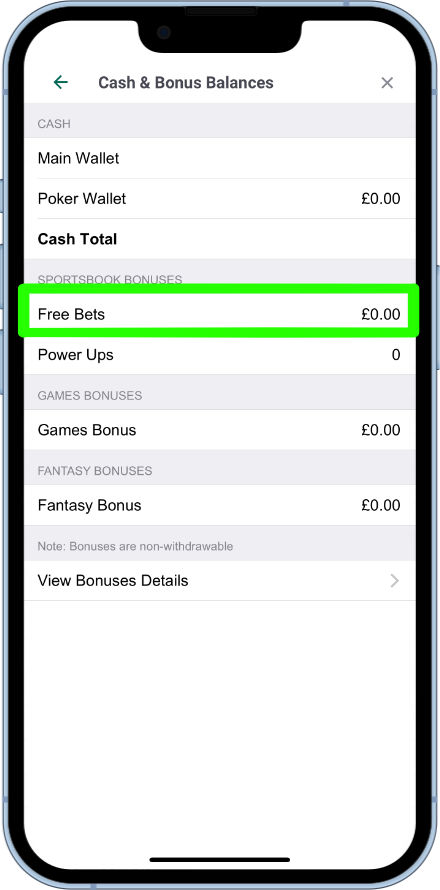
User menu → Cash & Bonus Balances. Bonuses and free bets linked to the account show here.
How to find cash-out markets
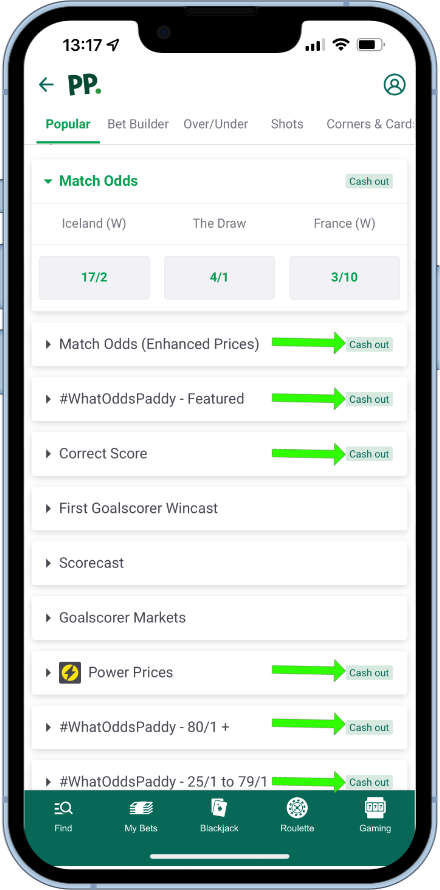
Open an event’s market list. Markets that support cash-out are clearly labelled with the cash-out icon; markets without the icon are not eligible.
How to find responsible gambling tools
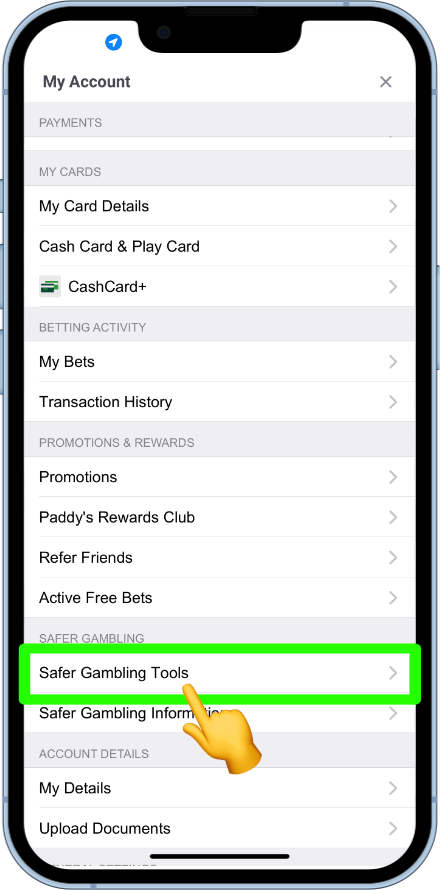
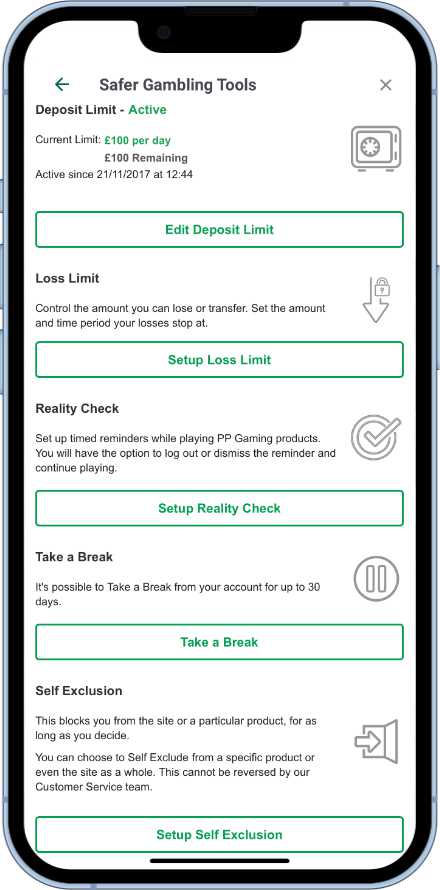
User account menu → Safer gambling → Safer gambling tools. You’ll find deposit limits, loss limits, reality check, take a break and self-exclusion. Full walkthroughs are in the Responsible gambling section below.
How to get help and support
User menu → Help. Search articles or open live chat via Message us. For safer gambling on this site, use the In Play contact page.
FAQ
How can I keep up to date with the latest Paddy Power offers?
Follow @paddypower on Twitter/X for offers, banter and occasional free-bet giveaways. Also check Promotions inside the app.
What’s the difference between the Paddy Power mobile site and the app?
There’s little difference between the Android app, iPhone app and mobile site — the app is there if you prefer an installed icon.
Will the Paddy Power app work when I’m on holiday?
Outside the UK it depends on the country. The Google Play listing is restricted to UK and Ireland territories; the mobile site works in some other countries.
Will Paddy Power price up my own bets?
Yes — tweet @AskPaddyPower or include #WhatOddsPaddy with what you want priced. Traders may decline high-risk requests.
Can I use the Paddy Power desktop site on mobile?
On smaller phones you’re directed to the mobile site. Larger tablets (for example an iPad Pro) may get the desktop layout.
How long does it take for bets to settle?
Paddy Power aims to settle within about an hour. If you’ve waited longer, contact live help with the bet details so they can investigate.
Where do Paddy Power get stats to settle bets?
They use Opta (and Opta definitions for certain markets), in line with most major bookmakers.
What is the maximum payout?
On sports, the headline maximum is £1,000,000 for selected football markets (match result, total goals, correct score, first goalscorer, Asian handicaps and handicap betting). Other markets and sports often have lower caps — check the help centre before building huge accumulators.
Can I choose a custom time for Take a Break or self-exclusion?
Not via the in-app pickers — only the preset periods. Support can review custom requests case by case.
Will I be listed as a problem gambler for using safer gambling tools?
No. Tools are there for many reasons (travel, focus, budgeting). Using them is encouraged when they help your situation.
Responsible gambling tools
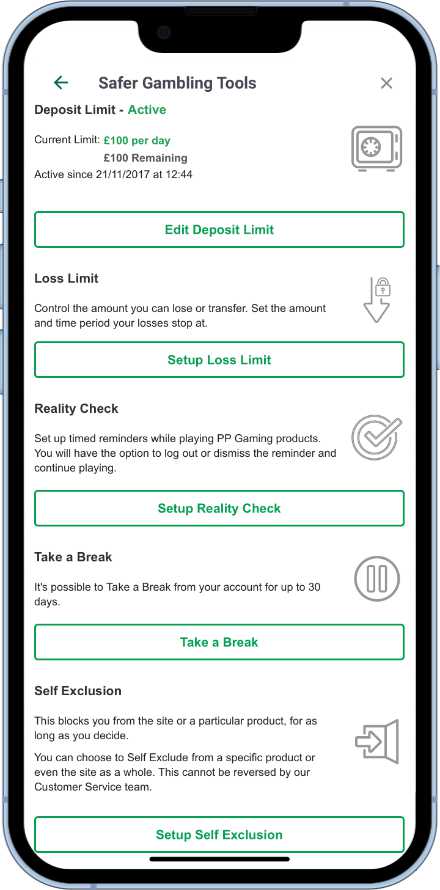
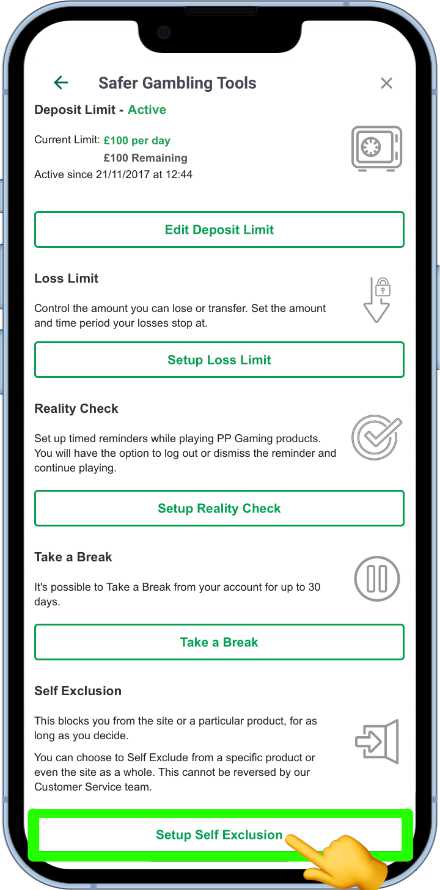
Paddy Power’s safer gambling tools live under account settings. On mobile: user icon → Safer gambling → Safer gambling tools. Available tools include deposit limit, loss limit, reality check, take a break and self-exclude.
How to access responsible gambling tools
From the home page, open user account settings → Safer gambling → Safer gambling tools. Scroll if the section isn’t visible. All five tools should then list.
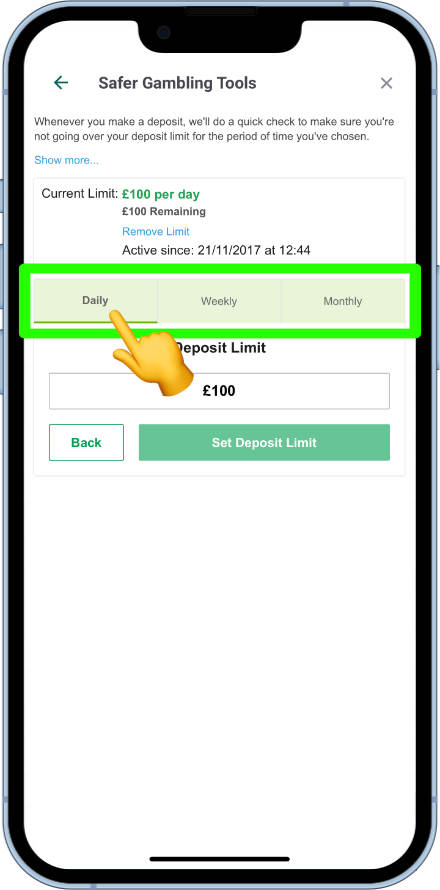
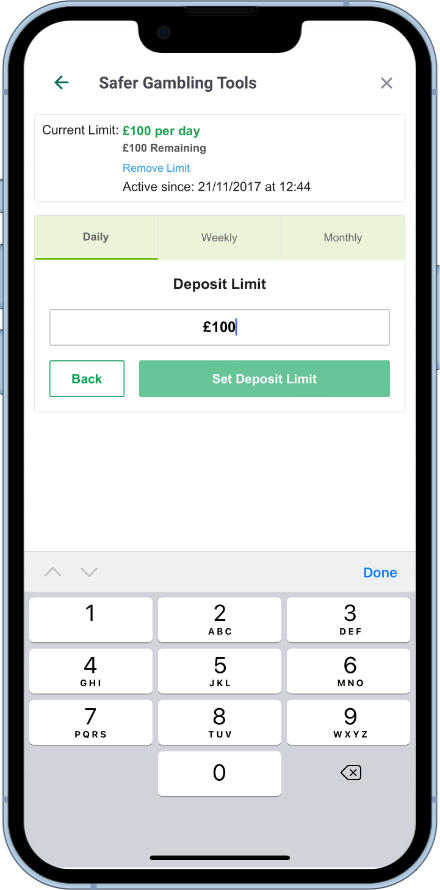
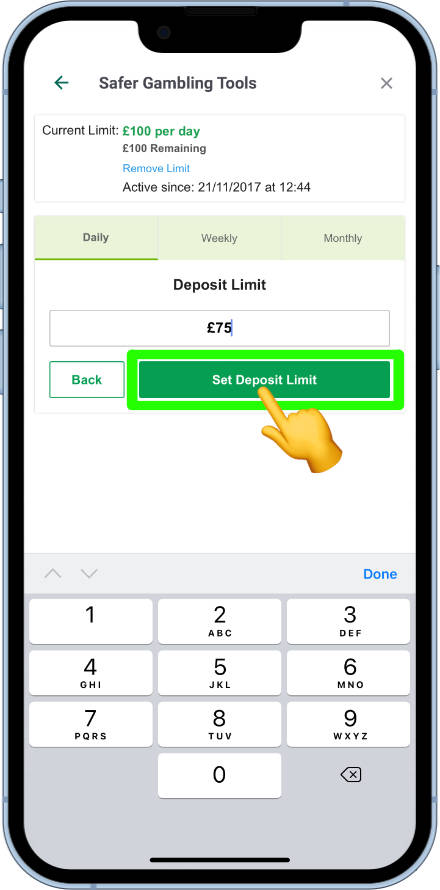
How to set a deposit limit
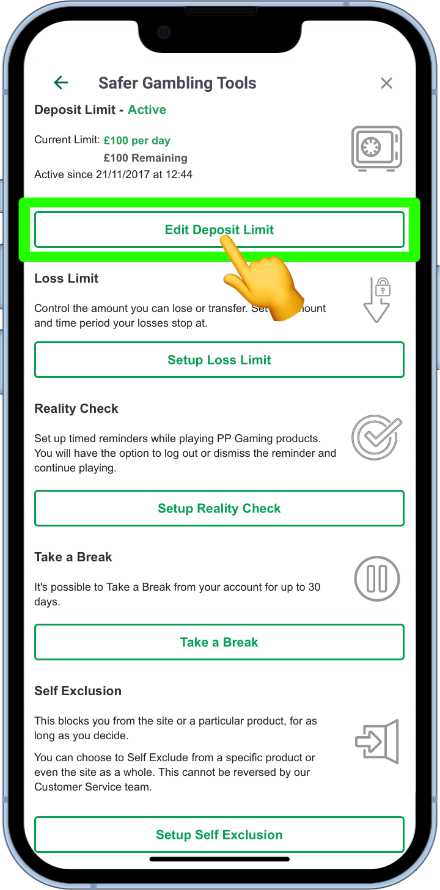
- Open Deposit limit and tap Edit Deposit Limit.
- Choose daily, weekly and/or monthly tabs.
- Tap the amount field, enter the limit on the keypad, then Set Deposit Limit.
Decreases apply immediately. Increases take 7 days to take effect — a cooling-off period before the higher limit activates.
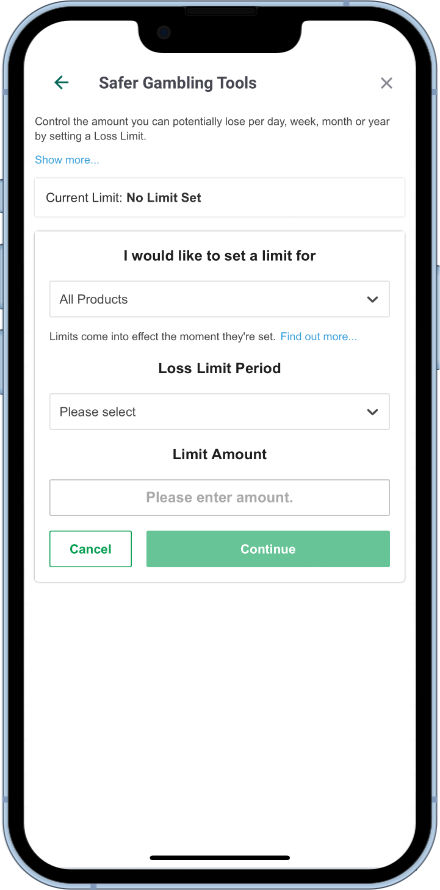
How to set a loss limit
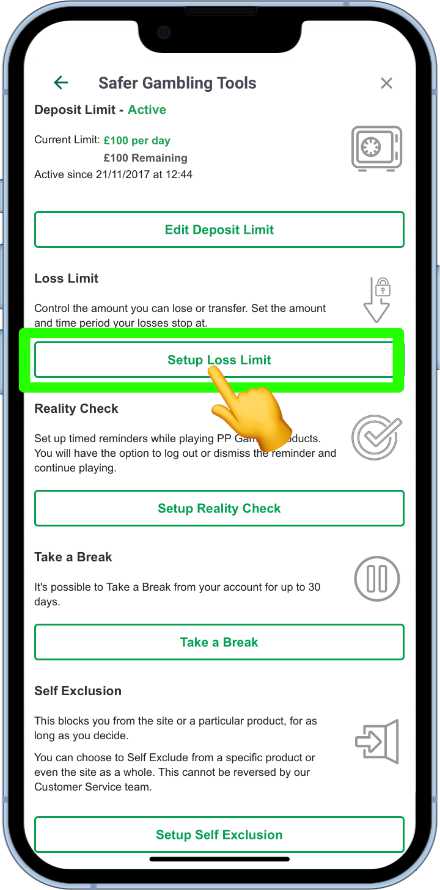
Loss limits help cap losses over a chosen period and product set.
- Open Loss limit.
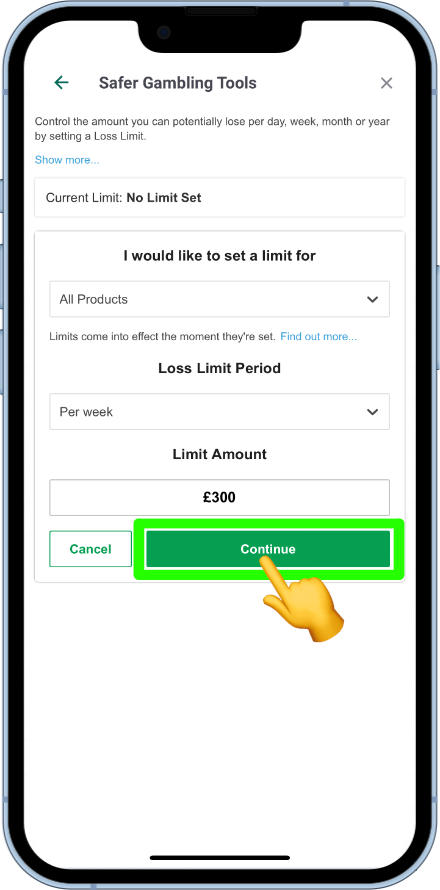
- Set Products (sports, casino, etc.), Time period (day / week / month / year) and Limit amount.
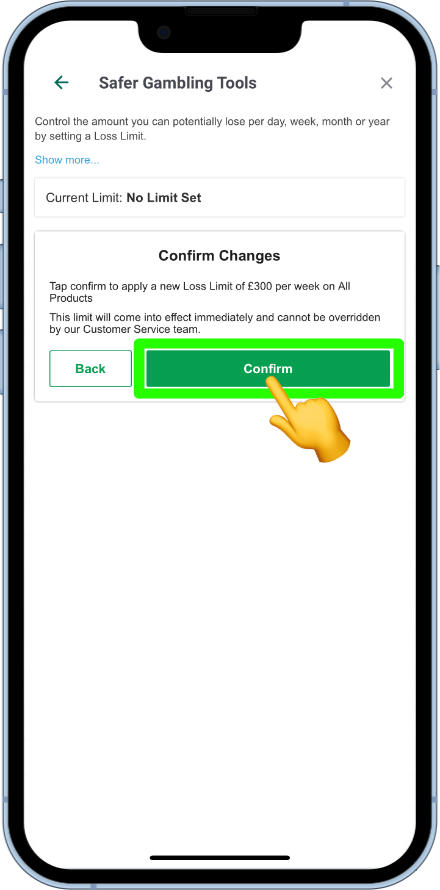
- Tap Continue, review the summary, then Confirm.
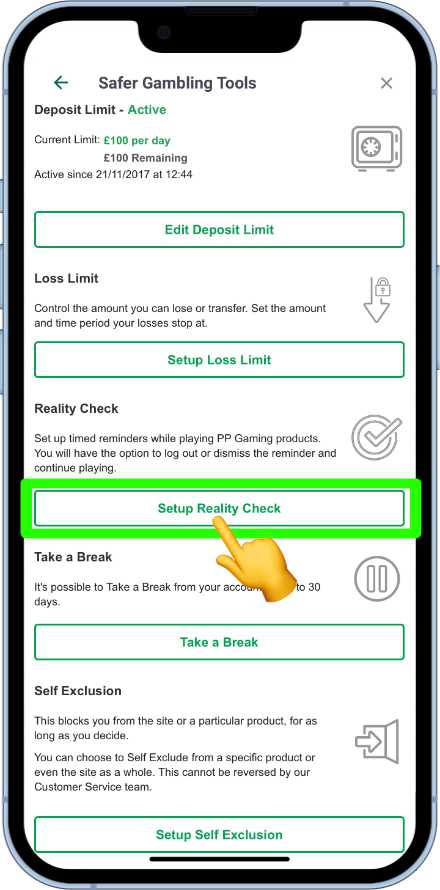
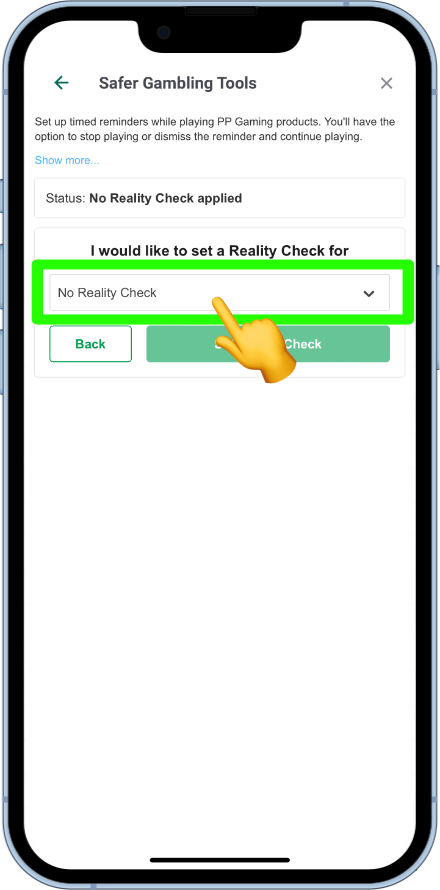
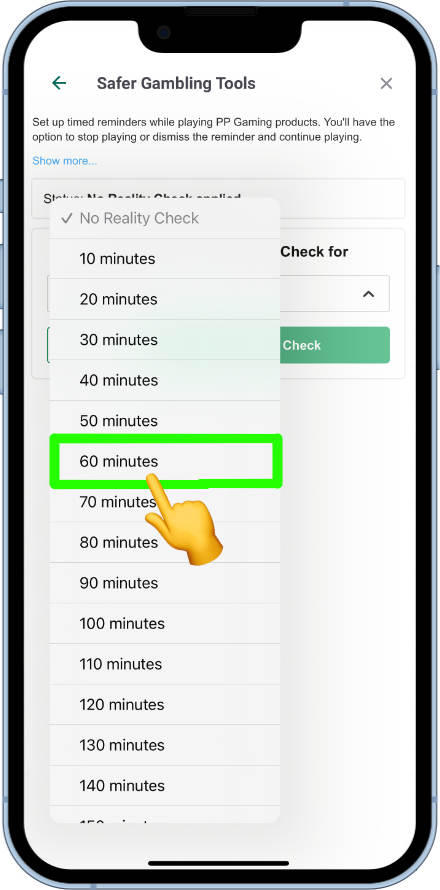
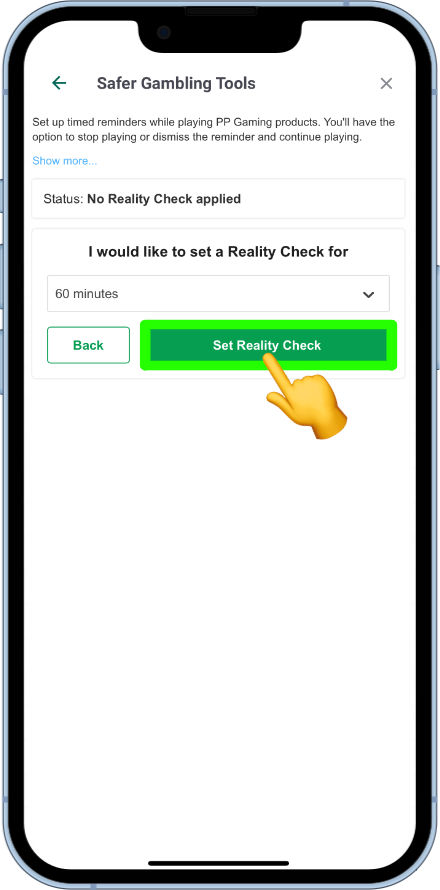
How to set a reality check
- Open Setup Reality Check.
- Tap the current period dropdown — options run from 10 minutes up to 180 minutes in 10-minute steps.
- Tap Set Reality Check.
How to take a break
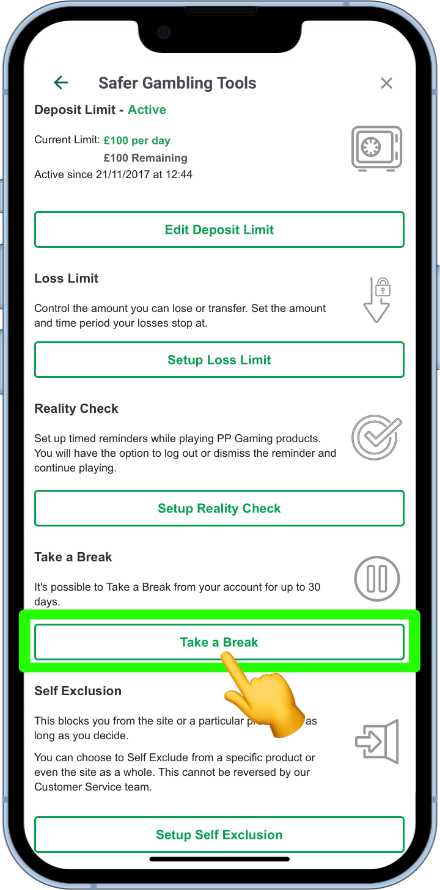
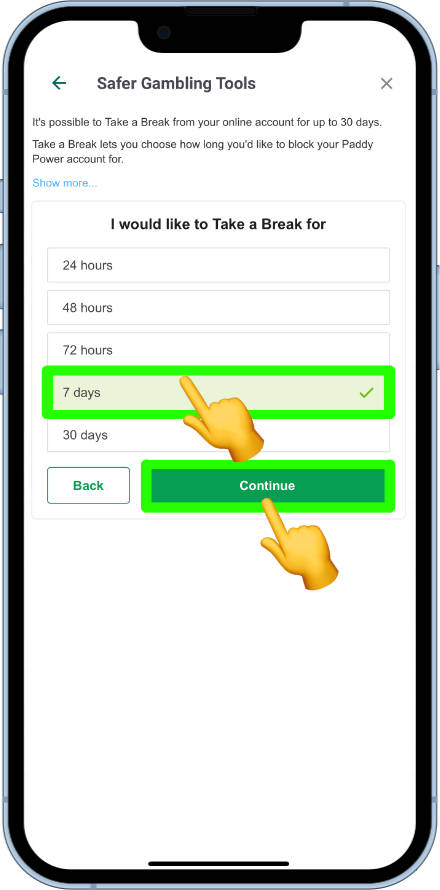
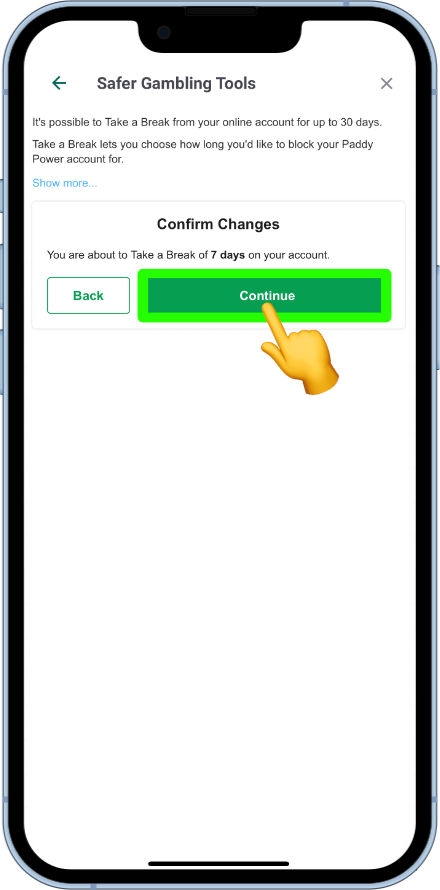
Temporarily closes the account for 24 hours, 48 hours, 72 hours, 7 days or 30 days. After the period ends, access returns as before.
- Open Take a Break and choose a duration.
- Tap Continue, then Confirm on the summary.
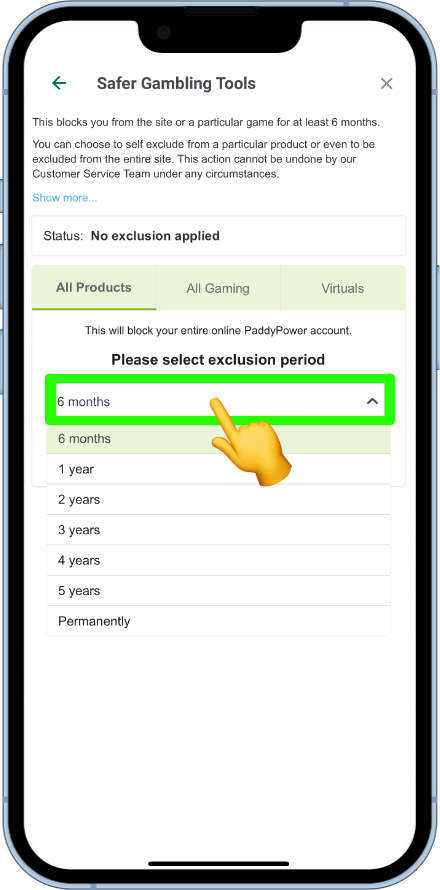
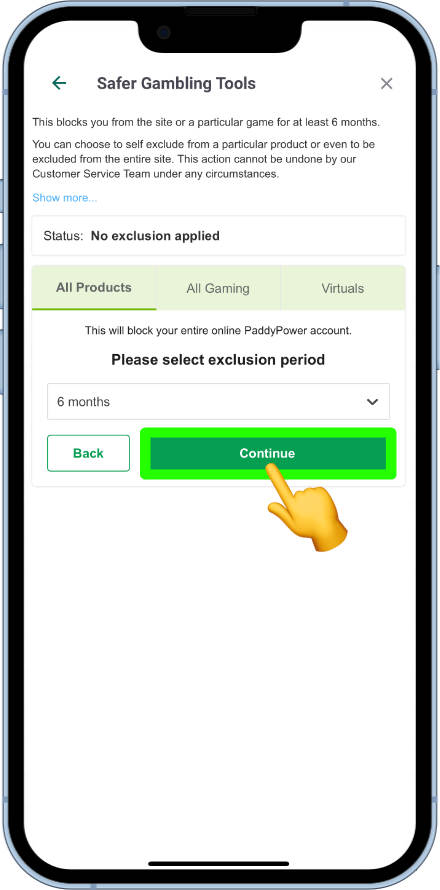
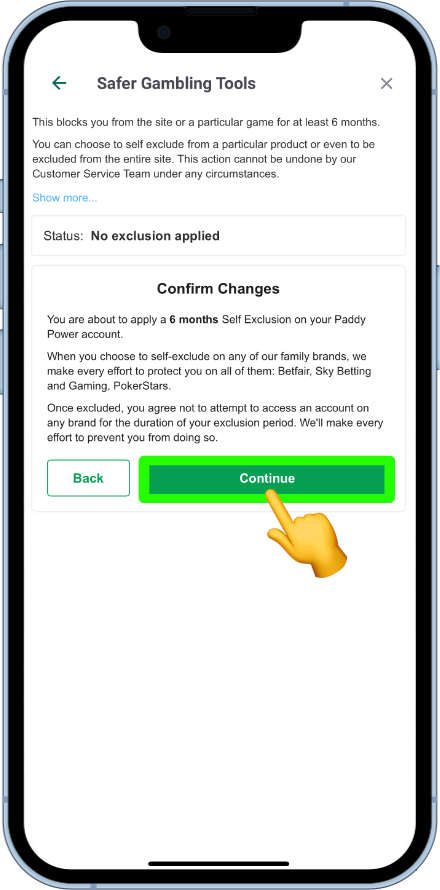
How to self-exclude
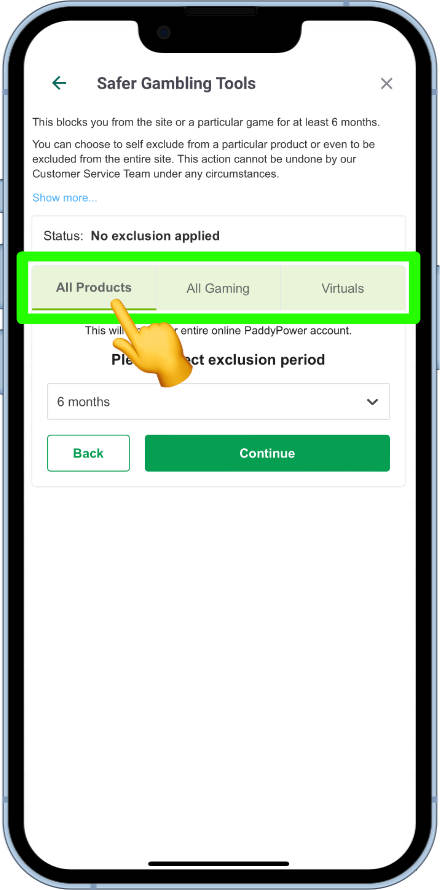
Use this for six months or longer. You can exclude from all products, gaming products or virtual products, for 6 months, 1–5 years, or permanently. Confirmation explains that Paddy Power will block you across wider Flutter brands (such as Sky Bet and Betfair) for the period. Permanent exclusion cannot be reversed.
- Open Setup Self exclusion and choose product scope.
- Choose the duration, tap Continue, review and confirm.
For multi-operator UK online exclusion, also consider GAMSTOP.
Further help and support
Independent help is available via BeGambleAware.org, GAMSTOP and GamCare. Paddy Power’s in-app help centre and live chat can walk you through the tools above. If you need to talk to us about safer gambling on this site, use the In Play contact page.
If gambling is causing harm, use the in-app tools and independent help via BeGambleAware.org or the National Gambling Helpline.
18+ | Please gamble responsibly | BeGambleAware.org | Terms apply to all offers and features mentioned above.